NextStep 快速上手与帮助
NextStep 0.1.8 · 快速上手 / Quick start
产品:NextStep · 支持/隐私邮箱:c399475130@live.com
四步接上自己的工作
打开 NextStep 侧栏。首次使用先“创建加密保险箱”,设置至少12个字符的难猜口令并保管;重启浏览器后用原口令解锁。无需NextStep账户。
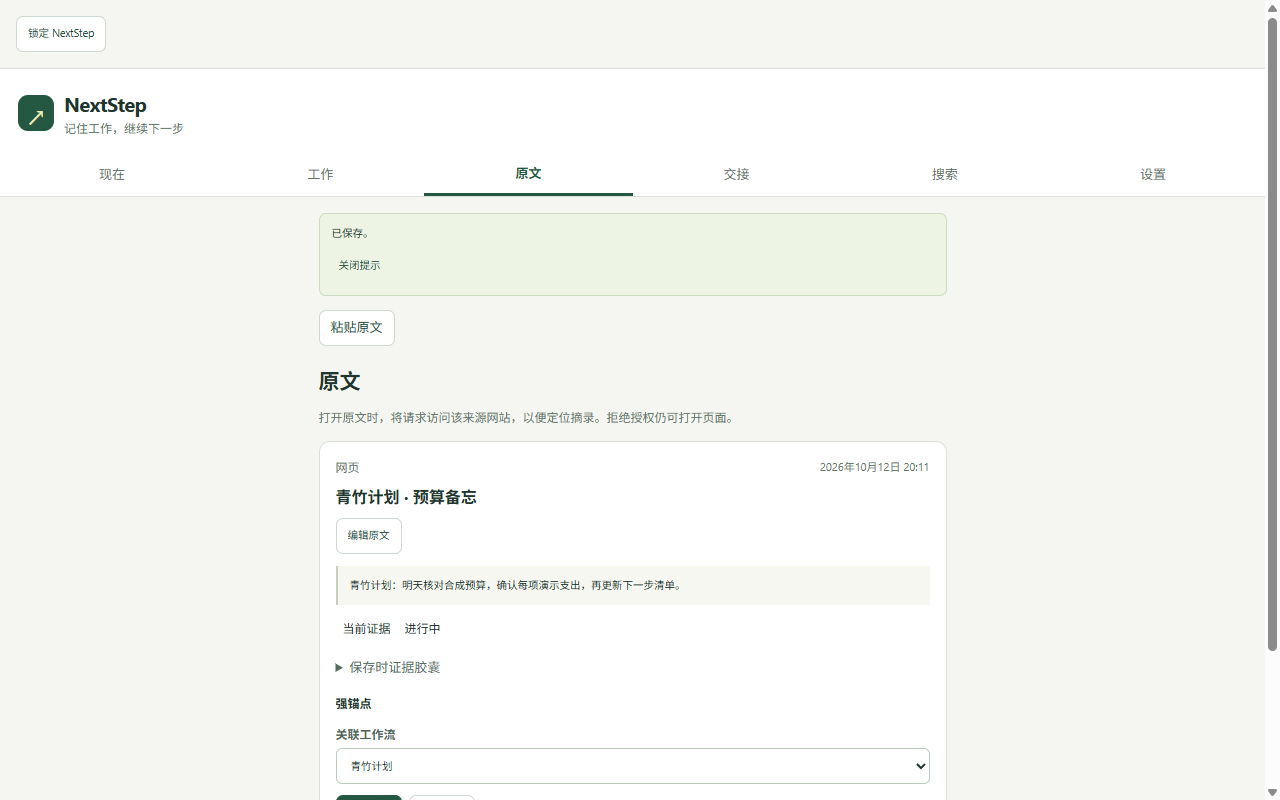
- 保存第一条原文。在网页选中一段文字,解锁并接受页面数据说明后,右键“保存到 NextStep”。到“原文”核对摘录与出处,确认已保存。也可选择“原文→粘贴原文”,填标题与原始摘录;有出处时在“手动填写或修正来源网址”补网址。空网址仍可保存、检索与阅读,但不能打开原页面。
- 留下一步并关联工作。“工作→新建工作流”填写工作名称、当前状态、下一步及去向后保存;已有工作直接编辑。原文卡片→“编辑原文”→“关联工作流”选择该工作并保存。只有工作名称必填;复制当前交接前须补齐状态、下一步和去向。
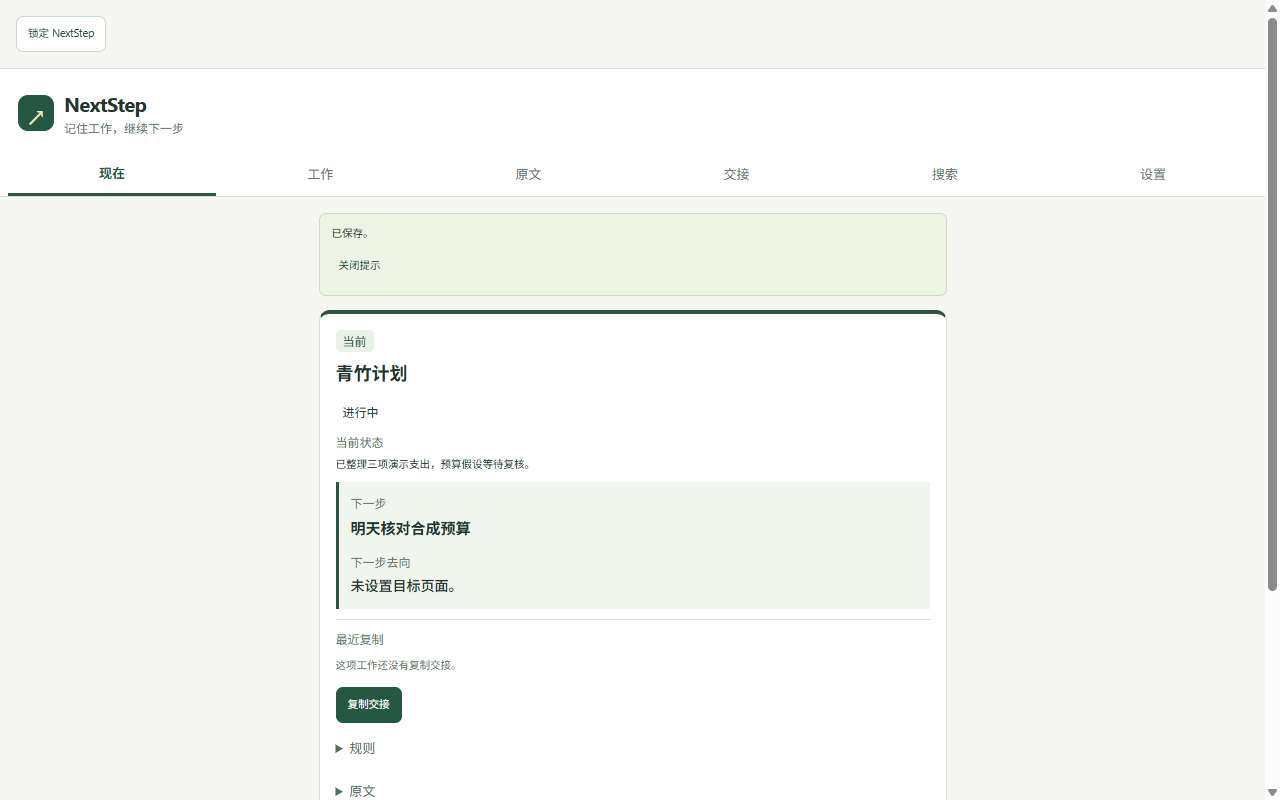
- 回来再找。在“搜索”输入段落中的独特关键词,选择“查看原文”或“查看工作流”。直接阅读保存的摘录,展开“原文详情”看出处;“现在”看当前状态和下一步。保存选段不等于保存整份网页或聊天历史。
- 打开原文。在原文卡片点“打开原文”,按需授予来源网站访问权限。可以定位的页面会尝试定位;原页面不再可恢复时,保存摘录仍可阅读。
“搜索已准备好”是交给你选择的状态。浅绿底纹、边框和“原文所在会话”标签核对的是来源会话,不是唯一消息;同一来源会话的多个结果都可能标记。原生关键词展示与链接保持可用,请自行点击对应结果并核对消息。
如果ChatGPT显示“重新加载数据”或“重新加载此消息”等提示,点击该目标消息对应的ChatGPT原生按钮。搜索分支不会自动点击结果或重载,也不会把搜索摘要当成正文定位成功。搜索词由保存摘录生成并交给ChatGPT处理;须有自己的账户和会话访问权限。
改词、结果变化或弹窗关闭后,旧来源标记会撤销;标记也有约三分钟的保留上限。没有来源标记或有多条结果时,自行核对,不把第一条当成已验证目标。
语言、保存与安全
- 界面语言:简体中文与英文,“设置→界面语言”可切换;不翻译保存内容。首次创建按浏览器界面语言初始化,通用中文及简体中文语言环境用简体中文,其他环境用英文(含繁体中文环境);解锁后已保存的语言选择优先;锁定界面初显可能仍跟随浏览器语言。ChatGPT网页内来源标签“原文所在会话”目前固定中文。
- 三种状态分开:保存摘录可读、搜索准备完成、原页面定位成功不是同一件事。原站找回失败不会自动修改你保存的工作状态;原话与出处可在原文卡片中继续查看。
- 交接:“复制交接”将当前已保存工作及关联原文写入系统剪贴板,记录最近复制,不自动保存每版交接全文。要保留正文历史,去“交接→新建交接包”显式粘贴并关联工作,等“已保存到本地”。
- 口令:至少12个字符,长且难猜。口令仅在本机处理,不发送给开发者。解锁后内容可读;本机加密不能防护被控制的浏览器或操作系统。
- 锁定与重启:锁定清除未保存草稿及待处理摘录,先保存再锁定;已加密保存的数据不会因此删除。浏览器重启后需重新解锁。
- 备份与卸载:在解锁后的“设置”点“导出加密备份”,保留文件和口令。恢复加密备份会替换当前工作、原文及交接,先备份现有数据,验证后再明确确认。删除浏览器配置也可能丢掉本机唯一副本;完成/归档工作不是完整备份。
忘记口令怎么办
忘记口令且保险箱已锁定后,NextStep 无法恢复其中的数据。加密备份仍需要加密该备份时使用的口令。
如果保险箱仍然解锁,请另存仍能读取的重要内容。逐项复制不是完整备份,可能遗漏记录关联、原始证据和修订历史。
本版没有恢复密钥、修改口令或忘密重置功能。不要为找回数据而卸载扩展或清空存储,这可能删除唯一副本。
测试版转商店版不保证自动继承数据;按最少数据保留步骤执行,保留旧扩展直到新安装恢复并核对。
现有界面截图(合成材料)
界面示例使用合成材料。
Quick start
Open the NextStep side panel. Create an encrypted vault with an unpredictable passphrase of at least 12 characters. Keep it safe; unlock again after restarting your browser. No NextStep account is required.
- Save a source. Select a passage on a webpage. Unlock, accept the page-data explanation, then right-click “Save to NextStep”. Check the saved words and source. Alternatively use Sources → Paste source, enter a title and excerpt, and add the source address under “Enter or correct the source URL manually” when available. A record without a web address remains readable and searchable but cannot open the original page.
- Leave the next action. Work → New workflow: save a work name, current state, next action and destination. Edit the source and select its Linked workflow. Only a work name is required to save a work; copying its current handoff also requires the state, next action and destination.
- Find it again. Search for distinctive words, then View source or View workflows. Read the saved passage and expand Source details for the address; Now shows the current work and next action. NextStep saves selected evidence, not a whole webpage or chat archive.
- Open original. Use Open original in the source card and grant site access when requested. Relocation may work on the original page; your saved excerpt remains readable when it does not.
When search is ready, click the appropriate native result yourself. Pale green rows and the label “原文所在会话” (source conversation) identify the saved conversation, not necessarily one unique message. Multiple rows may have this label. Links and native keyword highlighting remain available.
If the selected target message asks for “Reload data” or “Reload this message”, use that message's ChatGPT-native button. This search branch does not automatically click results or reload messages. Preparing search or highlighting a snippet is not proof of locating the original body. Search words derived from your excerpt are provided to ChatGPT and handled under its own policy.
Changing the query, changing results or closing the dialog removes stale labels; labels also expire after about three minutes. Missing or multiple labels mean you should verify the message yourself.
Language and data
The main interface supports English and Simplified Chinese. Change it in Settings → Interface language; this never translates saved content. New data defaults to Simplified Chinese for generic Chinese or Simplified Chinese browser-language locales, and English otherwise, including Traditional Chinese locales. Saved language choices take precedence after unlocking; the initial locked view may still follow the browser language. The source-conversation label inserted in ChatGPT currently remains Chinese.
Copy current handoff writes the saved work and linked evidence to your system clipboard and records the latest copy. It does not archive every full handoff. To retain the text, explicitly paste it into Handoffs → New handoff package, link the work, and wait for “Saved”.
Your passphrase is processed locally and is not sent to the developer. Lock discards unsaved drafts and pending captures, but does not delete the encrypted vault. Browser restart requires unlocking again. Export an encrypted backup from Settings while unlocked; keep its passphrase. A verified restore replaces current data only after your confirmation. Deleting the browser profile may also remove the only local copy. A completed or archived work is not a vault backup.
If you forget your passphrase
NextStep cannot recover a locked vault if you forget its passphrase. An encrypted backup still requires the passphrase used to encrypt that backup.
If your vault is still unlocked, save separate copies of important information you can still read. Copying individual items is not a complete backup and may omit links between records, source evidence and revision history.
This version has no recovery key, passphrase-change feature or forgotten-passphrase reset. Do not uninstall the extension or clear its storage to try to recover access: doing so may delete your only copy.
The original site's result and your saved work state are separate. Reading saved evidence, preparing search and successfully locating the original are distinct outcomes. Deep historical ChatGPT restoration is not guaranteed. Local encryption cannot protect a compromised browser or operating system.
Do not assume a store installation will automatically inherit a development installation's data. See the data-retention guide; preserve the old installation until the restored data is checked.
Publisher: Ahaloom Studio (灵织工作室). Product: NextStep. Support and privacy email: c399475130@live.com. See the privacy policy. Do not send your vault passphrase or unnecessary private content.